Showing posts with label Technology. Show all posts

Wednesday, October 20, 2021

Solving The Annoying Aspects of Technology

 There’s a lot to love about technology. It makes things easier, you can communicate with anyone in the world in an instant, and it affords flexibility, to name just three advantages. Indeed, once you begin to look up all that it can add to your life, you begin to wonder how people ever lived without having internet-enabled machines in their lives. However, it’s not as if things are all good. They can be annoying, too. 

And those annoying elements can seriously derail our enjoyment, not just of tech, but of our lives. In this blog, we’ll run through some of the frustrating aspects and also offer advice on how we can overcome them. 


Pexels - CC0 Licence


The Cost

Computers can bring a lot to your life -- but you’ll have to pay for the privilege. And alas, since nothing lasts forever, we often find that we need to pay just to keep them in our lives, be it through investing in a machine or costly repairs. Though there’s no way to avoid the expenses altogether, there are things you can do that’ll keep costs down. The number one thing to do is to look after your devices. Treat them with care, handle any problems when they arise, and keep a close eye on them. When you need to replace a device, take a look at refurbished products. They’re often just as good as new devices but can cost a lot less.


The Stress

One of the good things about computers and smartphones is that we’re always connected. But this can be problematic, too. When it feels like we’re always online, it can be difficult to get some headspace or to switch off from work. To get around this, it’s important to take a proactive approach to your tech time. Can you set yourself a couple of hours a day when your phone and computer are switched off? This can sound ridiculous to some people, but you’ll likely find that you get used to it pretty quickly!


The Updates

Updates can be good, but there are other times when we wish that the people that create devices would just leave them alone. While we can get used to a new layout, in some cases, apps that we used to rely on don’t work with the update, and that creates a problem. There is a way to regain access to your old apps, however -- revert back to the old platform you were using. If you’re a Mac user, then follow the instruction for creating a bootable installer. Just like that, you’ll be on a different OS type!


The Physical Impacts 

Computer devices are generally created with functionality in mind, not physical comfort. As such, many people -- especially those that type a lot -- can end up with wrist and finger pain or bad posture. Get around this issue by investing in a standalone keyboard and ergonomic mouse. A laptop stand will help to ensure your posture is correct. You should also take regular breaks to rest your body too. 


Wednesday, January 22, 2020

Is It Time To Digitally Declutter?

When many of us think of clutter, we tend to think of physical clutter. But there’s also a different type of clutter that can equally pose a problem – and that’s digital clutter. Many of us ignore it because it’s largely invisible to others, however it can still negatively affect us. Clutter of any kind can make it harder to think straight and could be causing us to complete digital tasks at a slower pace. Here are just a few ways digitally declutter.
Delete files you don’t want/need
There are likely to be huge amounts of files on your devices that you don’t want or need. They could be taking up unnecessary storage space, which could be slowing down your devices. A few common culprits include old documents from work or school, old photos, downloads and notes on our phones. There could also be other less obvious files taking up huge amounts of space – there are tools such as these apps that can find type of data. Deleting all your unwanted files could take several hours depending on how many files you have to get through. While you’re doing this task, it could also be worth reorganising your folders in case any files have ended up in the wrong place (such as word documents that ended up in photo folders).
Tidy up your desktop
Is your computer desktop a sea of icons? Consider getting rid of icons for programs that you don’t regularly use. Just like constantly working at a messy desk, a messy desktop can subliminally make you more stressed and unfocused – even if you’re certain that you know where everything is.  
Uninstall unused software/apps
There could be programs or apps on your devices that you never use. On top of taking up unnecessary space, they could be adding to the cluttered feel of your devices. Some software/apps may come pre-installed on your devices, while other software/apps may have been installed yourself. This guide lists some of the programs and apps that you may likely never use.
Unsubscribe from unread mailing lists
Many of us are signed up to mailing lists that we’re not interested in. This results in our inboxes getting flooded with emails that we have no interest in reading. It could even be causing you to miss important emails if you’re getting huge amounts of spam each day. Take the time to go through these mailing lists and unsubscribe (there will usually be instructions at the bottom of each email detailing how to do this). On top of email mailing lists, there could also be SMS mailing lists and browser notifications that could be nothing but a nuisance – unsubscribe from these too if you can.
Clear out your bookmarks
Do you have lots of bookmarks saved on your browser? Consider which of these bookmarks you really need – some may be shortcuts that you rarely ever visit. If you have extra tabs that open up whenever you load your browser, you could also consider clearing these out. This will help to make your web browsing feel faster and more focused.
Go on a Facebook friend purge
A Facebook friend purge could also be necessary for reducing clutter on your timeline. Many of our ‘friends’ with people that we don’t know all that well. It’s possible that you could keep seeing posts from these people, despite having no interest in their lives. Consider unfriending these people so that you no longer have to deal with their posts. Unfollowing pages that you have no interest in could also be worthwhile. You could find that scrolling through Facebook is a lot more rewarding afterwards. 


Wednesday, August 29, 2018

For Better Email Hygiene, Use an Email Verifier

Hygiene is something that people define as protecting oneself against bacteria or germs. But hygiene can be maintained in any aspect. Email hygiene is one of the most important things you need to maintain if you send email marketing campaigns. The best way to keep up with your email hygiene is by using an email verifier.
No automatic alt text available.
An email verifier will keep your email list clean and help you accomplish the success you deserve from your email campaigns. What does it do? It removes invalid email addresses from your list and protects your sending reputation. Internet Service Providers decide whether you’re a legitimate sender based on the quality of your email list. There are all kinds of bad addresses that could have ended up in your database:
- Spam traps: they don’t belong to actual people and are created only to lure in spammers.
- Catch-all emails: created to accept all emails sent to a particular domain, even when the address is not correct.
- Abuse emails: they belong to frequent email complainers who will mark your emails as spam.
- Misspelled email addresses: they are invalid and should be removed from your list to prevent bounces.

- Duplicate email addresses: it makes no sense to keep them in your list and pay your email service provider to send to them.
These are just a few examples of email addresses that an email verifier will identify and eliminate from your email list. Cleaning your database manually would be basically impossible, but an email verifier can do it in a matter of minutes or hours, depending on how many emails you need to verify. Email verifiers check the entire email list in no time, returning well-organized results. They keep the valid email addresses and remove the ones that would hurt your reputation and deliverability.
If your email list needs a scrubbing, contact an email verifier to take care of the job. The price is affordable and you can choose the right package for you, according to the size of your email list. After a good email cleaning, email campaigns see much better results: a lower bounce rate, better deliverability and a healthier sending reputation.
In today’s technological world where most of the people are working online, it is very important to have a good online reputation. With the help of an email verifier, you can have a good and well-maintained email list and thus can keep your reputation clean. When you have a messy email list, your email campaigns won’t return the results you’re expecting. But an email verifier you can clean your email list fast and for an affordable price. So, if you have not tried it yet, it’s time to look for an email verifier today and go for it. You can then send emails with full confidence that they will reach your target customers and help you build better relationships with them.


Monday, July 16, 2018

5 Home Technologies That Could Change Your Life

Technology has the ability to make life easier for homeowners. And who doesn't like spending less time on chores and repairs and more time enjoying the comforts of home? We are living in a world with more smart options for the home than ever. From kitchen appliances to HVAC and watering systems, here are some ways to keep cool and carry on.
1. Smart Sprinkler Controller
7e178f37398b4f004fda4c57794701e3.jpeg
Image via Flickr by ElectroSawHQ
Nothing says home like a nice yard, and backyard barbecues are what having a home is all about. Now you can have a green yard without having a green thumb, thanks to automated systems and connected apps. Their up-to-date weather and plant care information take the guesswork out of gardening. After the initial installation of the sprinkler system, all you have to do is set up the controller and connect the app. Unlike old-school sprinkler timers, these controllers can monitor for leaks, saving water and money.
2. Automatic Pet Feeders
How many times have you been at a party and had to say, “Sorry, I can't stay, I have to feed my cats”? Automated pet feeders make it easy to ensure your furry friend is fed on time wherever you are, eliminating the need for pet-sitters on an evening out. Many automatic feeders even include a pet camera that allows you to check in via Wi-Fi. More advanced models feature medication and treat dispensing services. 
3. In-App Ovens
Have you ever wanted to text your oven to have dinner ready when you got home? While that's not quite possible, you can connect to a smart oven with an app on your phone to have it preheated and ready to go when you step through the door. Other useful in-app features include remote temperature and timing control and integration with recipe apps for the perfect oven settings.
4. Smart Thermostats
Smart thermostats allow you to control your home's heating and cooling from the convenience of your smartphone. They include more adjustments than traditional thermostats, such as cooling individual rooms and detecting motion to automatically adjust rooms with activity. With an easy install by a professional, your HVAC system will make waking up overheated a thing of the past. With an app on your phone, home management is painless and precise.
5. Wi-Fi Coffee Makers
Do you need coffee to wake up enough to make your coffee? We've all been there. You can now start your cup of joe from anywhere with a tap on your phone. Or you can set it on a morning timer so you can wake up to the smell of a fresh brew. And with Wi-Fi integration, you can specify water temperature and brew strength without leaving the bedroom.
The marriage between apps and appliances is a happy pairing. It's a great example of how technology helps improve our quality of life and makes home care and service easy. Spend more time with family and friends and less time adjusting your in-home environment, because technology can do that for you.


Tuesday, July 10, 2018

The Four Essentials of a High-Performance Landing Page

A landing page is a standalone page used for digital marketing. The sole purpose of its creation is a marketing or advertising campaign. A perfect landing page should have a prominent trail to visit your virtual store. Creating an ideal landing page isn’t a simple task. It requires many essential elements. Especially the landing pages of digital marketing services should contain all the below-mentioned essentials for best results.
1.    A Distinguishing USP
The business owners often overlook the need for a Unique Selling Proposition, but they are unaware of its importance. It is a useful element for creating a business that customers love. Your page USP enhances the performance of the landing page. It is the actual proposal which is the unique feature of your company’s position in the marketplace. Craft your USP according to the clear expectations of your customers. It should define what advantages will the customers get by choosing your product and services. The USP can be divided into the following elements.
The main headline: the headline of the page must be unique and attractive.
The supporting headline: the supporting headline must elaborate your headline. It should further clarify the headline.
The reinforcement statement: this statement should further strengthen the description of the product or services that you are offering. It creates perfect landing pages.
The closing argument: It is the final chance to communicate the benefit of your services or products to the customers. It backs up the central proposition and contains a call-to-action.
2.    Visual Representation
The landing page should represent the context of use. It could be done by following the visual representation. The visual representation will act as the Hero Shot of the landing page. It will help the visitors in understanding what your website is and what it is offering.
Photos/images: Consider the example of a folding iron stand. After a short description of the item, a standard white background photo would work as the hero shot. You can also add additional pictures of a person using it and then fold it back afterward, saving the space.
Videos: As you know that a Camera never portrays falsehood, so a video is a more convincing way to showcase your products and services. The videos should impart a sense of need by illustrating direct advantages to everyday life.
3.    Social Proof
Your product or services could be the best globally. The online businesspersons should lay this claim. People never believe your entitlements unless they hear it from the other people. Social proof is there to help you out in this regard. Social proof will create a positive influence by the visitors who have used your products or services. When the visitors land on your web page, they have no idea whether your products or seo services in USA are praiseworthy or not. If you show them positive feedback, they will prefer availing your offer. You can use the social proof on your landing pages as follows:
•    Customer testimonials
•    Case studies
•    Number of shares
•    Embedded social media posts
•    Number of users
4.    Call-To-Action
A Call-To-Action is a proper invitation for the visitors to know more about the products and the services of the websites. The persons should understand what will happen next after they click a button. The Call-To-Action must be brief but effectively delivering the message. You can do the following things for it.
•    Start CTA with an action
•    It should contain 3-5 words
•    It should be the most prominent feature of your web page. For this reason, you can use contrasting colors.
•    Use these words, “Get Discounts,” “Save Now,” “Get Your Copy,” or choose your own description which best goes with your product, service or industry.

IPS USA is one of the leading digital marketing agencies that provide client-oriented digital and web application development services to customers across industries.


Wednesday, November 15, 2017

The Cell Phone Monitoring App: Pros & Cons

C:\Users\salman\Google Drive\Content Images\XNSPY\Mobile & Cell phone spy\FEB 2017\08.jpg

Do you need to check on someone regularly but don’t have the means to do so? At the present time tracking someone’s cell phone is the closest thing to know a lot more about their personalities than what they would normally reveal. Hence, a cell phone monitoring app can benefit you by combining the GPS tracker and monitoring features in a single app.
There are a lot of different cell phone monitoring apps available on the market. These apps are becoming an increasingly popular solution for businesses, parents, and people from other walks of life who need to keep an eye on their employees and loved ones.
But the question is: what are the monitoring apps? And are there any advantages or disadvantages of using them? Let’s address the first part of the question first.
What is a Cell Phone Monitoring app?
C:\Users\salman\Google Drive\Content Images\XNSPY\Mobile & Cell phone spy\FEB 2017\10.jpg
Cell phone monitoring apps are software designed to track the activities and information on a target device. This information is then passed on to a secure server where all data can be viewed through a remote control panel.
These apps are divided into two types on the basis of payment and features. The first type is a free type and is available as a time trial option with limited features.
The other type is offered as a multiple feature package with an amount to pay in order to access advanced features e.g. Xnspy. These features also vary from developer to developer and price of the package.
C:\Users\salman\Google Drive\Content Images\XNSPY\Mobile & Cell phone spy\FEB 2017\07.jpg
Pros:
  • They ensure safety
What forces someone to monitor a loved one? Aside from the curiosity and suspicion, the monitoring apps can actually be utilized primarily for the purpose of ensuring a loved one is secure and safe from harms of outside and digital world.
C:\Users\salman\Google Drive\Content Images\XNSPY\Mobile & Cell phone spy\FEB 2017\01.jpg
The welfare of a loved one or a family member can be at risk due to many things such as environment, the intention of others and above all, the digital world. There are many software that claim to be the best cell phone monitoring app on the market. However, their utility and ease determine their usefulness in the long run.
  • Enjoy the liberty of remote monitoring
These apps allow you to monitor anyone remotely. It means you don’t necessarily have to follow them physically to monitor them. They can not only track locations for you, they can monitor calls, surroundings and anything on their smartphone.
C:\Users\salman\Google Drive\Content Images\XNSPY\Location & Geofencing\April 2017\07.jpg
C:\Users\salman\Google Drive\Content Images\XNSPY\Location & Geofencing\April 2017\08.jpg
Let’s say that a fleet manager may need to track more than just vehicle positions. With a cell phone monitoring app like Xnspy engaged, the fleet manager can see exactly where the employee is whether they’re in a vehicle or outside of it. That makes a lot of sense for business point of view!
This can be especially useful for managers who are monitoring field operations—such as in utility companies that handle service calls. With data from the employee’s mobile device, managers could verify that employees were in proximity to a service call site for the duration of said call.
  • They are cost-efficient:
Having a mobile GPS tracking application is less than the cost of buying new GPS tracking devices and management software. In this way they, not only track vehicles, but help to keep in-touch with your employees as well.
C:\Users\salman\Google Drive\Content Images\XNSPY\Location & Geofencing\April 2017\10.jpg
Similarly, for parents, the cost of monitoring their teen at school and outside can be unbearable considering their busyness with their jobs and house chores. Having an app on their kid’s mobile gives them peace of mind and they are cheap. For example, you can use Xnspy for as low as $8.33 per/month.
Cons:
There are a few concerns regarding cell phone monitoring apps as well.
  • Risking sensitive information
Perhaps the primary drawback of any cell phone monitoring app is risking sensitive personal or business information. Some apps offer keylogging features that can steal passwords and other important information from your cell phone. In the same way, these apps can also be misused to spoof sensitive business information from the employees’ emails. But in the end, it depends on which type of app are you using. Many apps, such as Xnspy, do not offer keylogging feature so they cannot read your passwords.
  • Privacy Concerns

Reduced privacy is another concern of a cell phone monitoring app. Location information collected by these apps can provide an extraordinarily invasive glimpse into the private lives of cellphone users.

For this reason, it is possible to disable casual location tracking features such as the "Find My Friends" iPhone application. Tracking information remains available to the monitoring person or company for emergency services, however.


Sunday, September 17, 2017

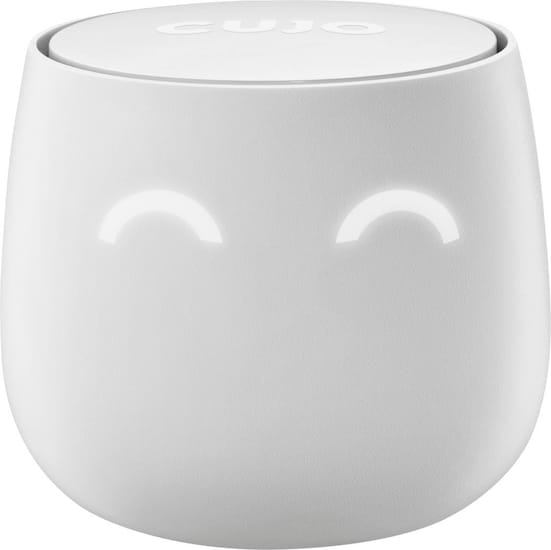
CUJO - Smart Internet Firewall Available at Best Buy | #CUJO

Home automation is becoming more and more common these days because a lot of people are now aware of the many benefits that it offers. We can choose the level of automation that our homes can have. A wide variety of smart home devices have been introduced in the market and a lot of people are already enjoying the advantages of having them in their homes. Some of the most popular smart devices are the home surveillance device which detects intruders as well as detect hazards including fires, water leaks and the presence of carbon monoxide, and the temperature control devices that adjust your thermostat accordingly.

One of the most important things that we must keep in mind in making sure that our smart devices are running smoothly and are secured and protected from any virus, is to have an internet firewall such as CUJO Smart Internet Firewall. The CUJO Smart Firewall protects all your smart devices against hackers. It detects and blocks malicious sites and hacks.
CUJO - Smart Internet Firewall (Free Subscription) - Ultra White - Front Zoom
It also help us safeguard and control our kids’ access online. This means that we can set the limit on the time that our kids can use their devices and control which sites are permitted. It also has a downloadable CUJO app which allows us to easily monitor our home automation network from any compatible iOS and android devices.
We were amazed on how many daily attacks to the network this gadget blocks. We couldn't be more satisfied with CUJO. A great device that protects all our Wifi connected devices. Highly recommended!
If you’re thinking of installing and using a couple of smart devices for your home, then the CUJO Smart Internet Firewall is something that you should seriously consider having as well. Check their website to find out more about it and how it can help you run a safe and secure home automation system.

Disclaimer: The reviewer has been compensated in the form of a Best Buy Gift Card and/or received the product/service at a reduced price or for free.


Friday, September 8, 2017

Powerful Tech Tools for When You're in Dead Zones

https://dp-publisher-files.s3.amazonaws.com/article/67108/r.jpg?AWSAccessKeyId=AKIAJH66TYFNHTNSWTBA&Expires=1504802705&Signature=yAOo2N6VrKZFlaJLEe0EQrRjVyE%3D

Half your job as a mother is worrying. You want to make sure your kids are safe and happy, especially when you're not right by their side. Your motherly anxiety increases exponentially when you can't get a hold of your children because either you or they are in a dead zone. While you may not be able to fix this problem completely, you can follow these steps to get better reception no matter where you are:

Identify the Problem

There are many reasons why you might not be getting cell reception. Some common explanations usually have to do with your location. If you can, get closer to the nearest tower or change your location. If you're in a crowded city, move away from tall buildings, cluttered rooms and other areas where your signal might be blocked. Take note of old movies and TV shows where people look silly waving their phones around or moving to a window. This isn't just for show (although it may be a bit exaggerated). The fewer obstructions you have, the clearer your signal will be.

Buy a Signal Booster

Sometimes you can't change your location just to get a signal. If you know you or your children are going to be in an area that is obstructed by buildings, trees or other objects, it's time to try a signal booster. These devices use an external antenna to pick up weak cell signals that your phone cannot detect and boost them up to 32 times their strength. WeBoost is a popular option  because it is FCC approved, works with all carriers and gives you a strong, clear signal.

Try a Femtocell

If you're in a cabin in the woods or tall office building where you have broadband internet, you can use a femtocell to transfer that signal to transfer that signal into cellphone reception. You need at least a 1.5 Mbps download speed and 256 Kbps upload speed to get a decent signal, so make sure your modem is up to the challenge. For example, Qualcomm offers lightning fast and reliable cellular modems so your femtocell won't slow your internet speeds down to a crawl. Each cellphone carrier has different names for their femtocells, and they typically range from $100 to $300. But you can't put a price on connecting with your children.

Use Alternative Devices

When you're in the middle of nowhere with no towers around, you may need to resort to a device other than your cellphone to communicate. Satellite phones, such as the such as the Iridium Extreme, are popular options because you can get a signal in even the most remote parts of the world. However, some of their functionality may be limited compared to your smartphone and they can be on the pricey side. If you're in close range to your children, walkie talkies are a viable option. These devices are great if you're driving over the border into Mexico or Canada in separate cars or if you get separated on a hike.

You have plenty of things to worry about as a mother, so don't waste your time with dead zones and dropped calls. Use the resources available to you and explain them to your children so you can always stay in touch. It's worth a few extra dollars and a little effort.


Wednesday, September 6, 2017

Making Use of Your Old Technology

One of the biggest problems in the modern world is the pace at which technology is growing. As purchase new equipment with better hardware, our old stuff becomes obsolete and they typically don’t serve much use. Much like with furniture, we can upcycle or reuse technology in some interesting ways, and here are a couple of ideas to help get you started.


Handing down older cell phones
Your cell phone might not have the latest hardware, but it’s certainly still able to make and receive calls and texts. Get your old phones repaired cheaply before the parts become too hard to find and you’ll always have a backup phone ready and waiting to be used. If you don’t have a use for older phones, then they can always be handed down to family members or even senior friends and relatives as a good starter phone to be used as practice. They might not come with the latest features, but they make great starting phones to practice with.

Turn an old tablet into a digital picture frame
Tablets are surprisingly power-efficient if you remove a lot of useless features. If you have an old tablet lying around that is too slow or underpowered to run the latest apps (or even watch videos) then why not turn it into a digital photo frame? It’s surprisingly easy, there is support for slide shows and it doesn’t consume as much power as you’d think. Don’t throw away or recycle your old tablets—turn them into decor! You can even hook up the tablet to your network so you can edit the pictures it shows through your wireless connection.


Use old tablets or phones for educational purposes
Although tablets and phones make fantastic educational tools, it’s all too easy to quickly switch apps and load up a game instead. If you have an old tablet lying around, then convert it into an educational tool by installing a bunch of child-friendly apps for the sake of learning. This will remove the connection between the tablet and fun by separating the two, and you won’t have to worry about your child sneakily playing games on the family tablet while your back is turned. Educational apps such as eBook readers and study software don’t take much space or require much power, so they make fantastic educational tools.

Scrap it for parts
If you’re DIY-savvy or want to get into electronics, then you can scrap your old technology for parts. There are plenty of usable materials and components in outdated technology, and it’s one of the simplest ways to upcycle your older equipment. If you’re not too sure on what to recycle or how to, then simply keep it stored in a warehouse or garage for now and try to keep it free of dust and dirt. When you gain enough experience, you’ll be surprised at how much use you can get out of an old computer or monitor when doing your own DIY repairs and builds.